

Reasoning & extended thinking
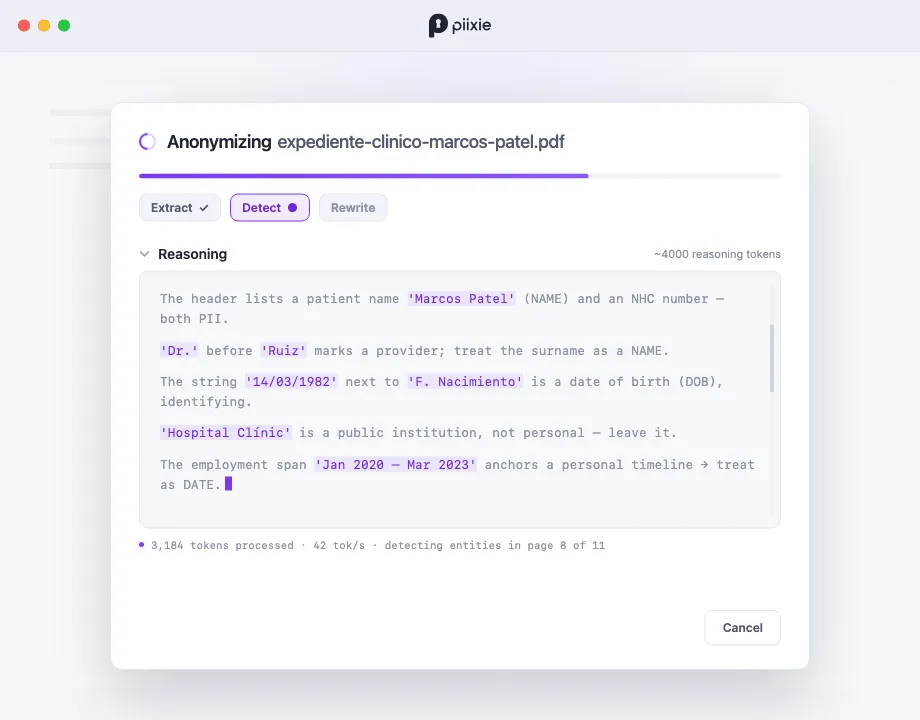
Some models can reason before they answer — work through a problem step by step instead of replying in one shot. For PII detection, that extra deliberation catches the hard cases: the date that’s only identifying in context, the first name that belongs to the person named in the header, the public institution that shouldn’t be scrubbed. Piixie can turn reasoning on, tune how much of it happens, and show it to you live.
What reasoning buys you
Section titled “What reasoning buys you”A model that thinks first tends to:
- Distinguish public from private — leave Hospital Clínic (an institution) while scrubbing the patient, instead of blanket-redacting every proper noun.
- Resolve references — recognize that Marcos, Sr. Patel, and Patel are one person and handle them consistently.
- Judge dates — treat an employment span as identifying but a press-release month as public. (See why LLMs for PII detection.)
The cost is time: more thinking means a slower run. That’s the trade you’re tuning.
Effort levels
Section titled “Effort levels”Reasoning is set per model, as an effort level:
| Level | Meaning |
|---|---|
| Default | Use the model’s own default (local models lean toward a light amount; remote ones use the provider default) |
| Off | No reasoning — fastest, one-shot answers |
| Low | A little thinking — a small quality bump for modest cost |
| Med | Moderate thinking |
| High | Maximum thinking — best on tricky documents, slowest |
As the hint in the app puts it: how much the model thinks before answering. Less = faster.
Setting it
Section titled “Setting it”In Settings → Models, each model has a Reasoning control:
- Override reasoning to pick a level for that model.
- Reset to default to hand the decision back to the model.
The choice is remembered per model, so your fast everyday model can stay on Low while a frontier remote model you keep for hard documents sits on High.
Which models support it
Section titled “Which models support it”- Local Gemma models — reasoning is supported through llama.cpp; Piixie passes a thinking budget sized to the effort level.
- Anthropic — uses the Messages API’s extended thinking, with a token budget scaled to the level.
- OpenAI-compatible — uses the provider’s reasoning-effort setting.
For remote endpoints, whether a model supports reasoning is auto-detected when Piixie fetches the model list, shown as a Reasoning capability you can toggle to override if the detection is wrong.
Watching it happen
Section titled “Watching it happen”When reasoning is active, the processing dialog grows a Reasoning section. The model’s thinking streams in as it works — you’ll see it weigh each entity (“‘Hospital Clínic’ is a public institution, not personal — leave it”) before committing. A small token counter shows roughly how much thinking it’s done.
This isn’t just for show: watching the reasoning builds confidence in the result, and when the model gets something wrong, the thinking often tells you why — useful when you go to edit the result or tune a profile prompt.
When to turn it up
Section titled “When to turn it up”- Up (Med/High): dense, ambiguous documents — medical records, contracts, anything where context decides what’s PII.
- Down (Low/Off): simple, high-volume documents where speed matters and the PII is obvious.