

The Anonymization Editor
The editor is where you go from “the model had a go at it” to “I’m happy to send this.” It opens any completed document in its own window with the original on the left and every detected replacement on the right, as a list you can edit. Change a value, turn one off, add one the model missed, draw a black box over a stamp — then regenerate the safe copy in place.
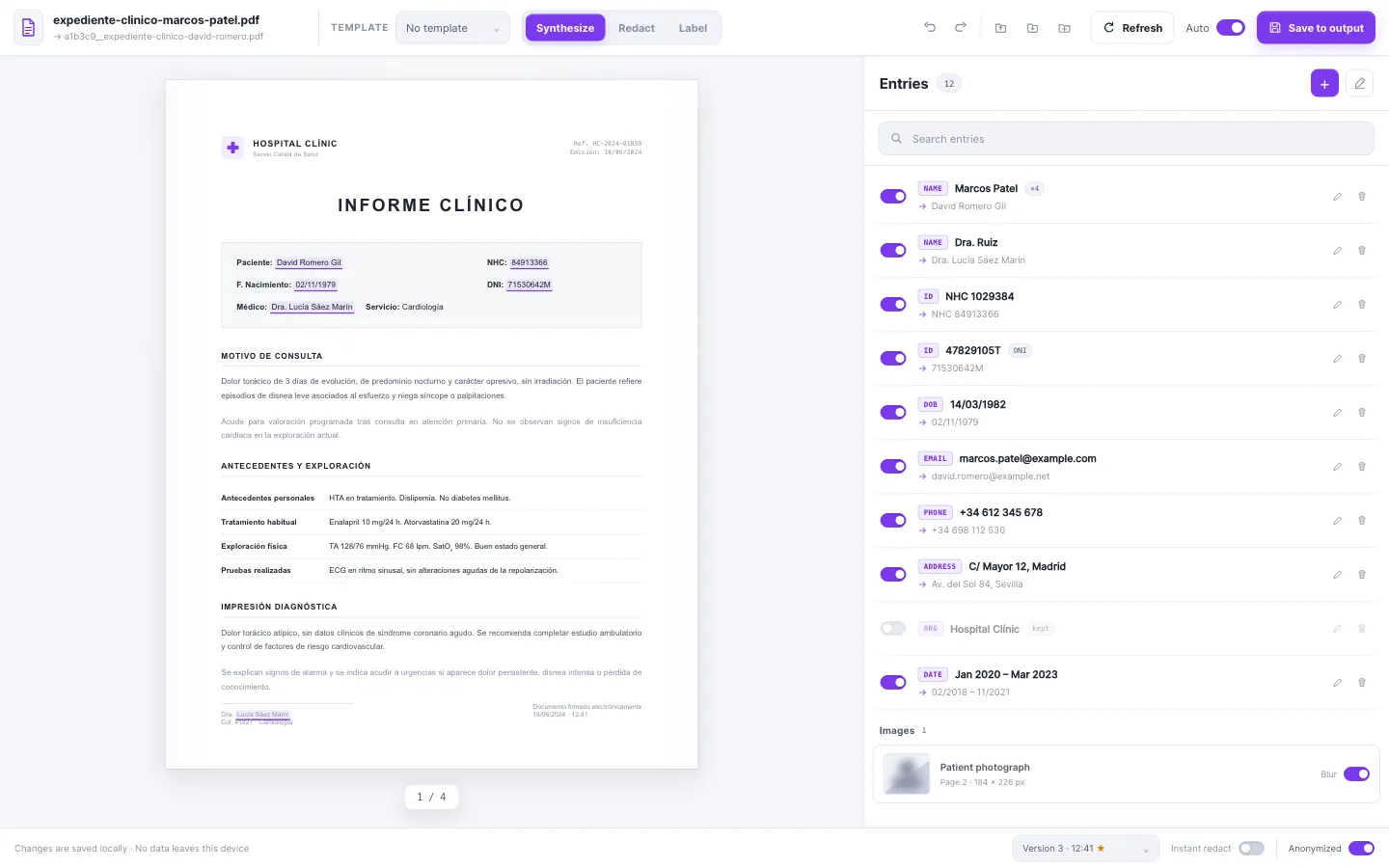
Nothing here re-runs detection. You’re editing the result of a run that already happened, so every change is instant and free. The model found the PII once; the editor is for the judgement calls only a person can make.
What you can do here
Section titled “What you can do here”- Read what changed — flip between the original and the anonymized result, or drop a black-bar preview over every detected value.
- Edit the entries — the right-hand list is every replacement, one row each. Turn entries on and off, fix a value, or change how it’s replaced.
- Add what the model missed — select text in the document and add it as a new entry.
- Draw redactions — drag a box over a signature, a photo, or a letterhead on a PDF and bake a black patch into the output.
- Switch the whole document’s method — turn a synthetic document into a redacted one (or back) with one click, keeping your hand edits.
- Save versions — every regenerate is a version you can compare; promote the one you like to the real output file.
- Save edits as a template — capture “keep the company name, synthesize every name, redact this stamp” and reuse it on the next document of the same shape.
Open as many as you want
Section titled “Open as many as you want”The editor is a full window, not a dialog. Open three documents side by side, leave one open while you work in the main window — they stay in sync. Start at Opening the editor.
A two-minute tour
Section titled “A two-minute tour”- In the Completed list, click the editor icon (overlapping frames) on any row.
- The window opens showing the anonymized result. Skim it.
- Spot something wrong? Find it in the right-hand list, fix it, or flip its switch off.
- Spot something the model missed? Select it in the document, click Add.
- Click Save to output. Done.
Everything renders locally. Opening a document in the editor sends nothing anywhere — it’s the same privacy guarantee as the rest of Piixie.