

Dictionaries
A dictionary is a saved set of original → replacement pairs. It’s how you make anonymization consistent across documents, not just within one. If “Acme GmbH” must always become “Globex AG” in every export your team produces — across files, across days, across people — a dictionary guarantees it, instead of hoping the model lands on the same fake value twice.
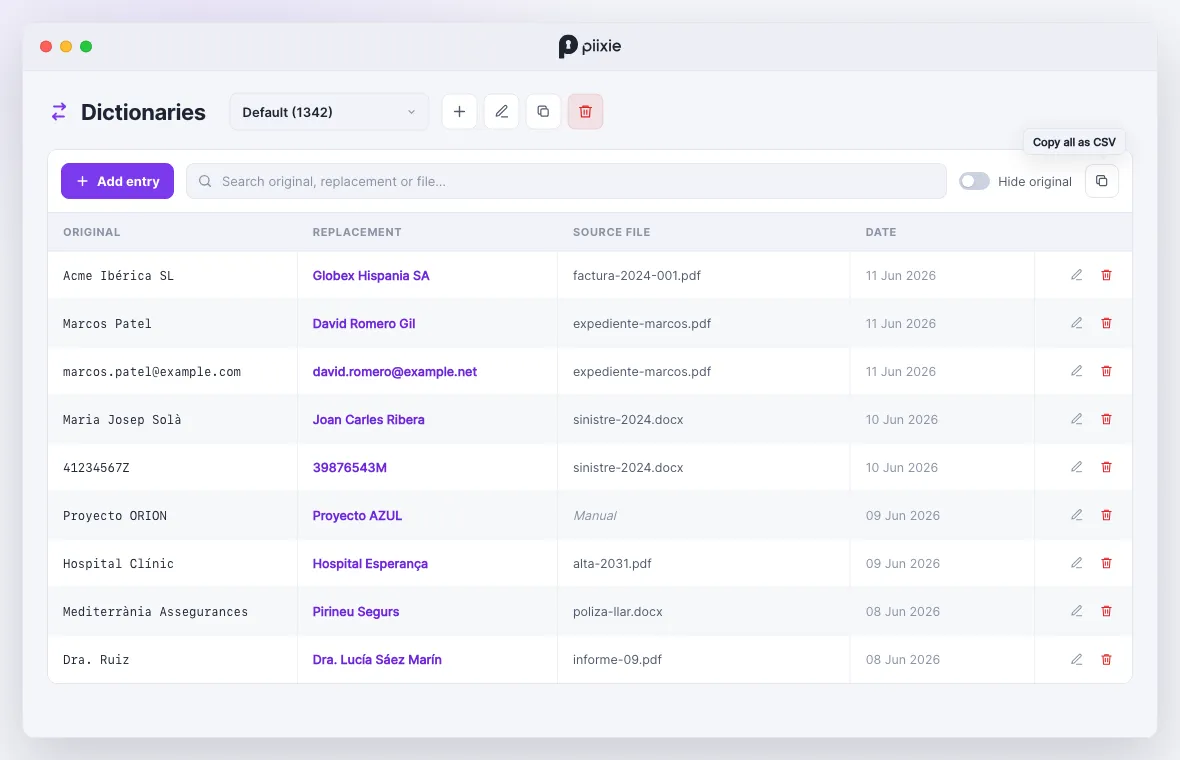
The problem dictionaries solve
Section titled “The problem dictionaries solve”Synthetic mode is internally consistent — within one document, every mention of a person maps to one fake identity. But run the same person’s file again next week, or process a different document that mentions them, and synthetic mode has no memory: it’ll invent a fresh fake name each time.
For a one-off document that’s fine. For an ongoing workflow — a recurring report, a customer whose files you anonymize repeatedly, a shared set of test fixtures — you want the same real value to always become the same fake value. That’s a dictionary.
How it works
Section titled “How it works”A dictionary holds pairs. When it’s attached to a profile, Piixie applies those pairs alongside the model’s work:
- A known original in the document is replaced with its fixed dictionary value, every time.
- New values the model synthesizes can be added to the dictionary, so next time they’re known too.
Each entry maps one original to exactly one replacement. Re-use an original with a new replacement and it overwrites the old one — a given term always resolves the same way, with no duplicates.
Where they come from
Section titled “Where they come from”- By hand — add entries in the manager.
- From a run — let Piixie promote a run’s generated replacements into a dictionary.
- Imported — paste or build a CSV of pairs.
The Default dictionary
Section titled “The Default dictionary”Piixie ships with a Default dictionary that can’t be deleted. You can add your own dictionaries for different contexts — one per client, one per project, one for a test suite — and attach whichever fits the job.
In this section
Section titled “In this section”- The dictionary manager — the window where you curate them
- Adding & editing entries
- Building a dictionary from a run
- Attaching a dictionary to a profile
- Dictionary recipes
Dictionaries also power reverse deanonymization — the same pairs that swap real for fake can swap fake back to real.